


Zoom a Video Online for Free

Drag and Drop video here
or
Browse Video
Supports MP4, MOV, M4V, WebM etc.
Zoom a Video Online for Free
FlexClip gives you complete control over video scale via zooming in and out in clicks. No download, no experience required.
A mobile phone version of this tool is coming soon. Please visit flexclip.com in your computer browser to use this free tool.
-

Supports All Popular Formats
FlexClip supports all popular video formats, like MOV, M4V. Your videos can be processed via this excellent video editor.
-

Easy Zooming
You don’t need to go through complicated editing process. Select a zooming parameter to change the video scale.
-

Free to Use
It is free to use FlexClip to zoom video, no extra charges!
How to Zoom in/out Video in 3 Steps
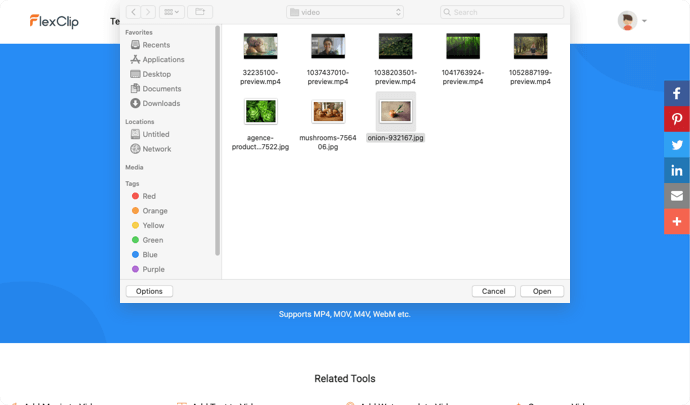
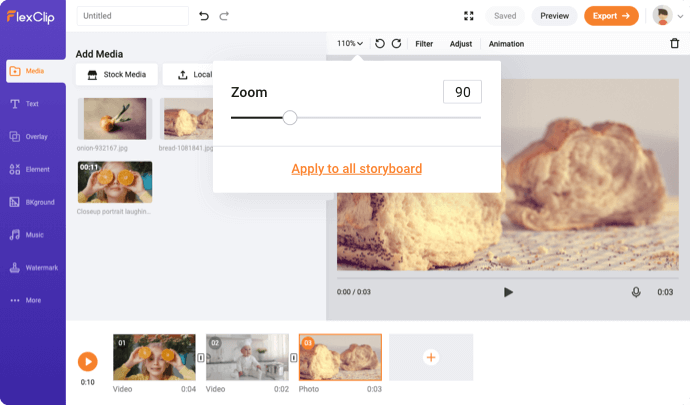
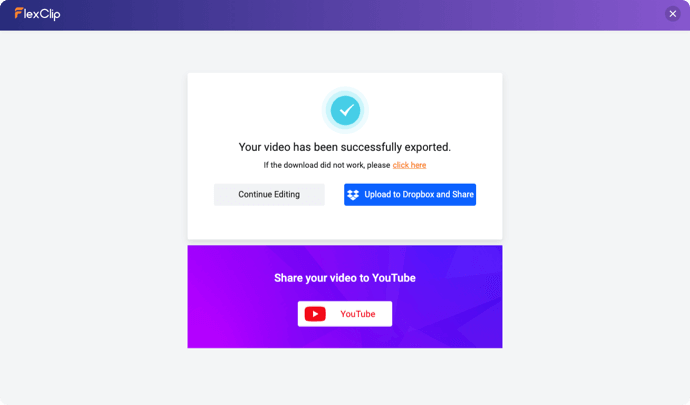
1. Choose a Video
Upload your video from the computer.
2. Zoom Your Video
Select a parameter for zooming in or out.
3. Export the Video
Click the Export button to download your video without any quality loss.
Cutting Tips
The length of the video you uploaded exceeds the limit. To ensure the user experience, it will be trimmed from the beginning of the video to 30 minutes. You can upload more videos in the editor.
Cancel
Got it
Related Tools
- Add Watermark to VideoFilter VideoMute VideoTrim VideoVideo BrightnessMerge VideoRotate VideoVideo SpeedSplit VideoFlip VideoConvert Audio to VideoVideo Collage MakerOnline Montage MakerMotion Graphics MakerAdd Audio to PhotoAdd Image to MP3Video MaskingPicture in Picture Video EditorVideo CollaborationLoop VideoSpeed CurveVideo Link GeneratorResize VideoCrop Video